Category:
Responsive Web Design
Client:
MetLife Mexico
Duration:
14 Months

(PRODUCT & PROCESS)
AWP (Agent Web Portal):
AWP is a web portal designed to enhance the efficiency of insurance agents in managing client information. This comprehensive tool allows agents to easily access MetLife product information, related documents, payment, policy and claims details, and create quotes, all accessible on any device. Whether in the office, on-the-go, or with a client, AWP ensures seamless information sharing.
My role:
As the leader of the UX design team, I collaborated closely with business analysts and the product team to create high-fidelity mocks and prototypes during the production phase. My focus was on ensuring the successful implementation of the design.
Business Problems Addressed:
We tackled the challenge of agents using multiple platforms for their day-to-day tasks by consolidating all necessary features into a single platform. This eliminated the need to switch between different systems, such as the Java app for creating quotations. Additional problems addressed included saving documents as favorites, previewing and downloading documents, and displaying appropriate errors and notifications.
Design process:
The design process involved gathering requirements from the business team and through initial user stories and identifying pain points for brainstorming solutions. Wireframes were created and presented to stakeholders, with iterations based on their feedback. To ensure consistency and accessibility (WCAG 2.1 AA standards) across applications, I utilized the MetLife global design system and style guides for high-fidelity mockups and prototypes. Testing the development work to ensure high-quality implementation of the designs.
Usability testing:
Usability testing with agents was conducted in a moderated, remote environment, and results were shared for evaluation and prioritization. Examples of improvements based on testing the quotation feature included updating content, changing the calendar plugin, adding tooltips, and reducing scrolling. The quotation stepper was identified as easy to follow.
(FEATURES)

Quotation dashboard

Quotation search

New quotation

New quotation summary

Profile

Documents

My agents

Clients

Products
(DESIGN SOLUTIONS)
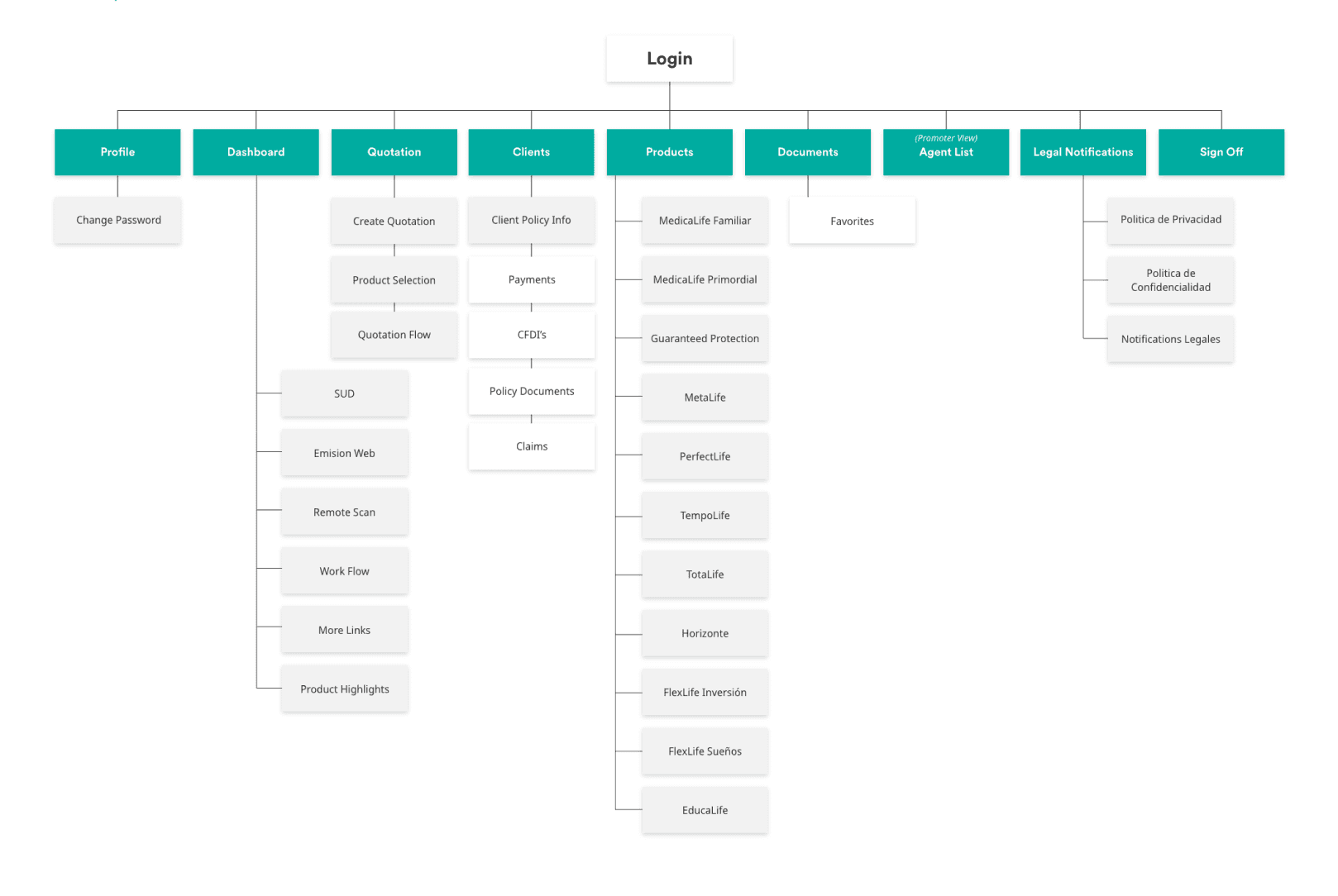
Sitemap
Throughout the process, this sitemap was continually updated to incorporate new features and existing features that were expanded upon the new requirements with the business team.

Design solution: skeleton loaders
The concept of skeleton loaders was initiated in response to a request from the technical team, as there was a notable delay on the screen. Furthermore, skeleton loaders align with the latest industry standards.

Design solution: empty states
These illustrations were crafted to inform users that the system currently lacks content to display and to provide guidance on the subsequent steps.
New feature; quotation user flow
This represented the most crucial and intricate feature set to be integrated into the application. Its primary objective was to assist agents in generating quotations of each plan for their clients.
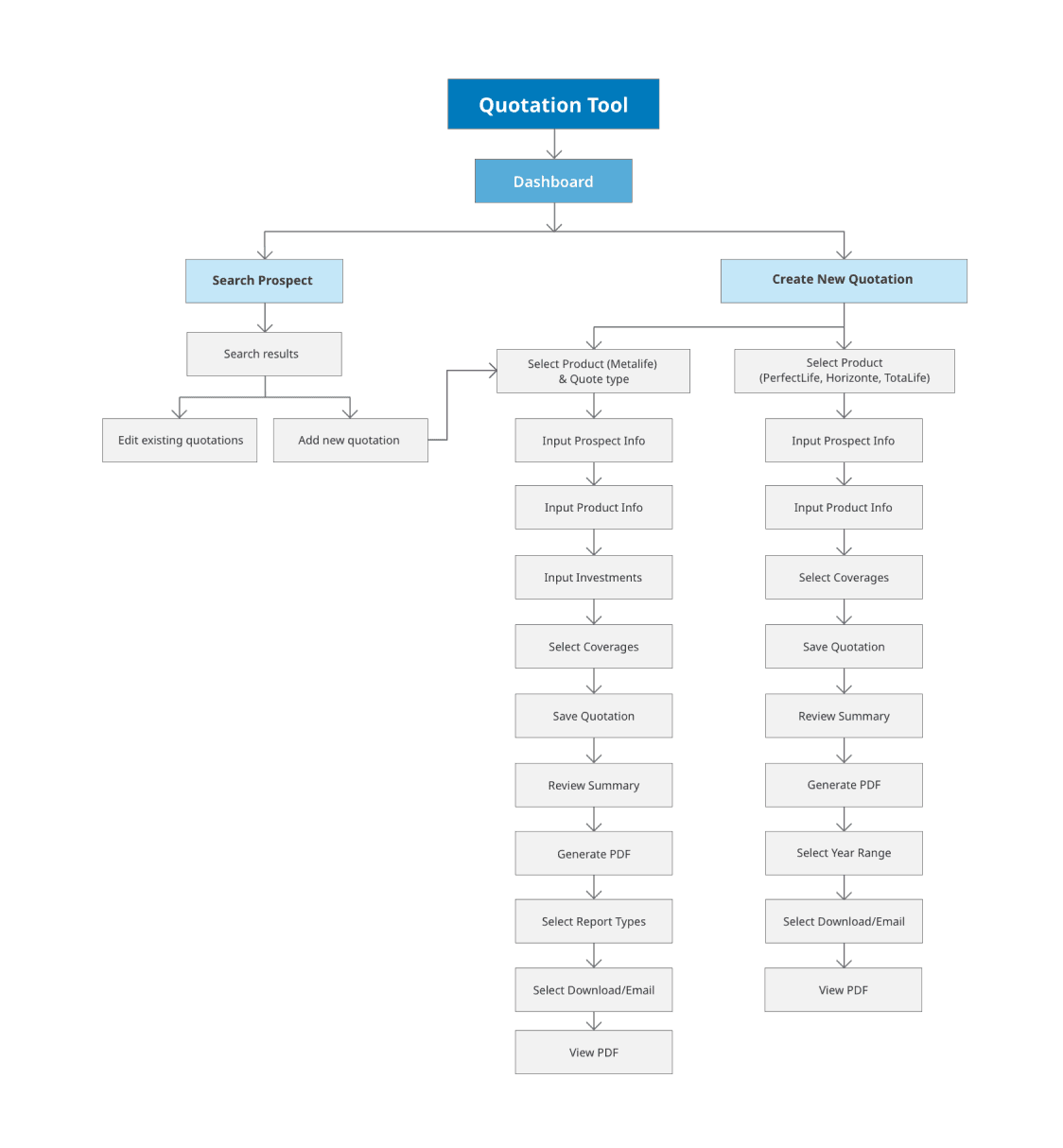

Wireframes; quotation feature
These wireframes illustrate the workflow of the quotation tool, demonstrating how users can access and manage all quotations from their clients.

Wireframes; quotation feature
The above wireframes present the sequential steps that users must follow to create the quote.

Design Solution; quotation stepper
These ideas represent the exploration of various ways to present all the steps involved in the quotation creation process. Multiple ideas were considered, taking into account the responsive nature of the application, as users may access it on their phones or iPads. Ensuring functionality on smaller screens was a key consideration.
Collaborate with developers
My responsibilities included crafting user flows for the development team, conducting design demos for each sprint, performing UI/UX testing on the developers' work, and maintaining close collaboration with them on a daily basis.

Challenges:
Adapting to shifting business feature priorities resulted in the postponement of some usability testing insights. Ensuring timely deliverables for the development team was crucial. Communication and alignment among the QA, DEV, and BA teams occasionally presented challenges. Keeping user stories up to date was important.
Communication and alignment between the QA, DEV and BA teams posed a challenge at times. Keeping the user stories up to date.
Measuring success:
Success was gauged through feedback collected during usability testing, focusing on factors like ease of use, time on task, and task success rate of the platform. Demo sessions and retrospectives were valuable in gathering insights from stakeholders.
Key takeaways:
The experience provided valuable insights on collaborating with stakeholders, testing developers' work, implementing research findings, prioritizing tasks effectively, and staying on track with assigned user stories in each sprint. Proactively bringing improvement ideas to retrospective sessions, demonstrating deliverables to stakeholders, facilitating onboarding for new team members, and proposing designs for missing components to the global design system team were essential aspects.
Looking back:
Reflecting on the journey, proposing new components for the design system, such as adding buttons with icons and incorporating micro-interactions, was part of the ongoing improvement process. Advocating for more usability testing and the implementation of the new design system were key considerations for enhancing the overall design and user experience.
Propose new components for the design system such as addition of buttons with icons, micro-interactions. Ask to conduct more usability testing and implementing the new design system.